A Website Content Workflow Needs Clear Handoffs, Not More Statuses
A Website Content Workflow Needs Clear Handoffs, Not More Statuses

A draft often stalls because nobody knows what “ready” means for the next person. A website content workflow should remove that ambiguity. Each stage needs an owner, a useful input, a visible output, and a condition that allows the work to move forward.
Planning article production stages establishes those handoffs before writing begins. Organizing editorial review processes keeps reviewers focused on decisions they are qualified to make. Maintaining consistent publishing schedules protects realistic capacity, while tracking content updates efficiently preserves what changed after the original publication.
Define six handoffs before opening the draft
- Request to brief: Confirm the audience question, purpose, page type, evidence, owner, and deadline.
- Brief to draft: Approve the scope, sources, claims, outline, and required action.
- Draft to review: Deliver complete copy with unresolved questions clearly marked.
- Review to page build: Resolve factual and editorial comments, then lock approved copy.
- Page build to release: Check layout, links, metadata, mobile presentation, and ownership.
- Release to maintenance: Record the live URL, publication date, dependencies, and next review trigger.
This is not a demand for six meetings. Planning article production stages is useful precisely because handoffs can happen asynchronously when the required artifact is clear. The Strikingly guide to organizing and scheduling content connects planning, ownership, calendars, and performance measurement across the website content workflow.
Open a production record before assigning a writer

Strikingly Blog Post Editor
Planning article production stages begins with the request, not the draft. Capture who requested the content, the audience problem, intended business result, existing page or topic, format, primary source, subject expert, publication window, and reason the work deserves priority. A website content workflow becomes easier to manage when every assignment begins with comparable information.
Planning article production stages should distinguish decisions from activities. “Research” is an activity; “confirm the three claims the article must support” is a decision. “Editing” is an activity; “approve structure, accuracy, and reader action” describes an outcome. Clear outcomes prevent work from remaining indefinitely active.
Set an exit condition for the brief. Before drafting starts, the team should agree on what the article will answer, what it will not cover, which evidence is required, and where the reader should go next. Planning article production stages at this level reduces rewrites caused by a late discovery that stakeholders wanted a different page.
Do not use one production path for every task. A legal correction may move directly from verified source to approval and release. A research article may need interviews, outline review, drafting, fact-checking, and design. Planning article production stages means selecting the smallest responsible path for the risk and complexity of the work.
A website content workflow should display the current owner and next decision, not merely “in progress.” This supports tracking content updates efficiently because a colleague can understand whether the work is waiting for data, review, design, approval, or publication without reconstructing the history from messages.
Organizing editorial review processes means separating expert and editorial review
Strikingly Blog Dashboard
Organizing editorial review processes begins by assigning different questions to different reviewers. A subject expert checks facts, limitations, examples, and terminology. An editor checks logic, usefulness, structure, tone, and repetition. A publisher checks the page build, metadata, links, permissions, and live behavior. Combining concerns in one unfocused review creates conflicting comments.
Give each reviewer a decision window and a response format. They should approve, request a specific change, or identify a named blocker. Organizing editorial review processes works poorly when comments arrive through unrelated chats, documents, screenshots, and verbal notes. Organizing editorial review processes requires one review record.
Review in the right order. Facts and scope should stabilize before sentence polishing; approved copy should stabilize before final page formatting. Organizing editorial review processes in sequence prevents an editor from perfecting text that a specialist later removes. It also protects maintaining consistent publishing schedules from avoidable rework.
Use a small comment vocabulary: factual correction, required clarification, structural recommendation, style preference, and approval. Organizing editorial review processes becomes faster when the author can tell which feedback blocks release. Preferences can improve a draft, but they should not silently become emergency requirements.
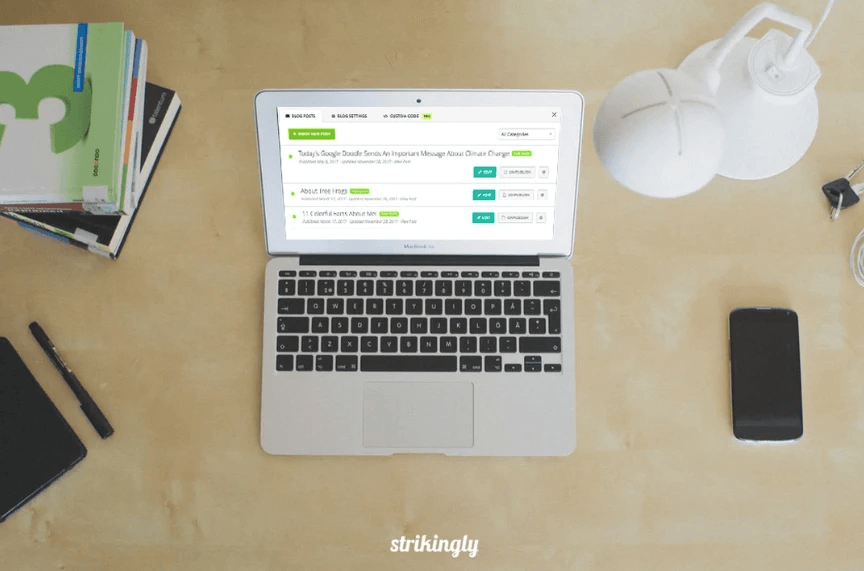
Strikingly's Blog Posts Manager supports creating, editing, publishing, unpublishing, duplicating, and organizing posts. Use that interface for publication state while the website content workflow retains the brief, ownership, review decision, and maintenance history.
A website content workflow needs preview as the release gate

Strikingly Blog Preview
A copy approval is not a page approval. A website content workflow needs release review of headings, paragraph breaks, lists, link destinations, image references, metadata, mobile wrapping, calls to action, and any form or embedded element. Organizing editorial review processes should include this assembled-page check because formatting can change meaning or hide important information.
Strikingly's blog publishing guide distinguishes saving from publishing and explains post settings, preview, immediate publication, and scheduling. That distinction is valuable for a website content workflow: saved work can be inspected without changing the live article.
Use a release owner rather than assuming the last reviewer will publish. That person confirms the final version, scheduled time, subscriber choice, campaign links, and rollback plan. Maintaining consistent publishing schedules depends on knowing who can release the page and who will verify it after it becomes public.
For search readiness, check the title, URL, meta description, headings, internal links, and useful coverage. Strikingly's guide to optimizing blog posts for search engines covers post-level SEO settings. Planning article production stages should reserve this check before release instead of treating metadata as a rushed final addition.
Maintaining consistent publishing schedules requires capacity planning

Strikingly Blog Scheduler
Maintaining consistent publishing schedules starts with the narrowest shared resource. If one expert reviews every technical article or one publisher builds every page, that person's capacity determines the reliable pace. A calendar that ignores review and page-build time is a list of wishes.
Plan backward from the useful public date: release verification, scheduled publication, page approval, page build, editorial approval, subject review, draft, research, and brief. Maintaining consistent publishing schedules becomes practical when each stage receives enough time and late work cannot simply consume every downstream buffer.
Keep a small reserve of approved evergreen work. If a source interview moves or a launch changes, the team can use a prepared article without lowering standards. Maintaining consistent publishing schedules should mean a dependable rhythm of useful work, not publishing an unfinished draft to protect a streak.
Use scheduling only after approval. The Strikingly Scheduled Posts update explains future publication, while Blog Email Subscription covers subscriber notifications. Maintaining consistent publishing schedules must coordinate the live page and any promised distribution rather than considering publication complete at the button click.
Review the near-term queue once a week. Discuss only work due soon, work that has exceeded a stage limit, and decisions that affect another assignment. Planning article production stages gives the review a shared map; maintaining consistent publishing schedules gives it a reason to resolve blockers before they become emergencies.
Tracking content updates efficiently keeps the workflow open after publication
Tracking content updates efficiently begins by treating the live article as maintained information. Record the canonical URL, owner, publication date, sources, claims likely to expire, related pages, campaign dependencies, and next review trigger. A website content workflow that stops at publication cannot explain why a later change was made.
Tracking content updates efficiently uses triggers instead of arbitrary refresh quotas. A product change, legal update, new customer question, broken link, declining qualified traffic, changed screenshot, or newer evidence may justify review. Tracking content updates efficiently means capturing the signal, assessing its impact, and assigning a specific next action.
Tracking content updates efficiently requires a useful update note
Changed: Identify the heading, claim, link, image, offer, or instruction that changed.
Reason: Name the new fact, customer need, policy, product behavior, or performance evidence.
Verified: Record who checked accuracy, page behavior, and related content.
Next review: Set a date or event that should reopen the article.
This note supports tracking content updates efficiently without requiring a long narrative for every typo. Use a lightweight record for small corrections and a fuller review for changes to claims, structure, conversion paths, or compliance. Organizing editorial review processes should scale with the risk of the update.
Connect the article to its topic system. Simple Blog Categories can organize recurring themes, and multiple blog sections can display selected categories in different locations. Tracking content updates efficiently includes checking related links and category placement when an article's role changes.
Measure whether the content still performs its intended job. Strikingly built-in analytics can show page and source patterns, while Google Analytics 4 can support deeper event and path analysis. Tracking content updates efficiently should connect an observed change to a decision, not create reports nobody acts on.
Review the website content workflow each month. Look for stages with repeated waiting, feedback that arrives too late, missed scheduling dependencies, and updates with no owner. Planning article production stages should change when the same handoff fails. Organizing editorial review processes should change when comments repeatedly conflict or duplicate one another.
A dependable website content workflow leaves evidence at every handoff. Planning article production stages clarifies what must be produced. Organizing editorial review processes clarifies who decides what. Maintaining consistent publishing schedules respects real capacity, and tracking content updates efficiently keeps published work accurate. Start with one article, document its six handoffs, and improve the system where work actually waits.
